Canvas Cross-Listing
Cross-Listing Requests
Faculty may request to cross list two or more of their own course sections only if they are the same modality so the sections appear in a single Canvas site. (You will be able to tell them apart in the gradebook if needed by filtering the views.)
Faculty often request this when they're teaching multiple sections of the same course — say, two sections of the same online course, or two face-to-face sections meeting at different times — and want to manage everything in one place rather than duplicating announcements, assignments, and grading across separate sites. Combining same-modality sections can save significant time and keep course materials consistent for every student.
Cross-Listing Requests Involving Multiple Course Modalities
Per the Provost, we are not authorized to approve cross-list requests that combine sections offered in different modalities (for example, online with face-to-face, or hybrid with online). This protects the clarity of the student experience. Combining courses of different modalities can cause materials or communications specific to one modality to appear for another, which can confuse or worry students trying to plan their semester.
If you have a cross-listing request that involves multiple modalities, we're glad to talk through alternatives that meet your course goals while keeping the student experience clear. Please reach out to us at [email protected] to discuss your options.
Cross-Listing Requests for Courses Assigned to Different Faculty
Two or more faculty members may cross list their sections if they are the same course OR are a lab to a course. Both faculty members must agree to the cross-listing in writing.
The Cross-Listing Process in Canvas
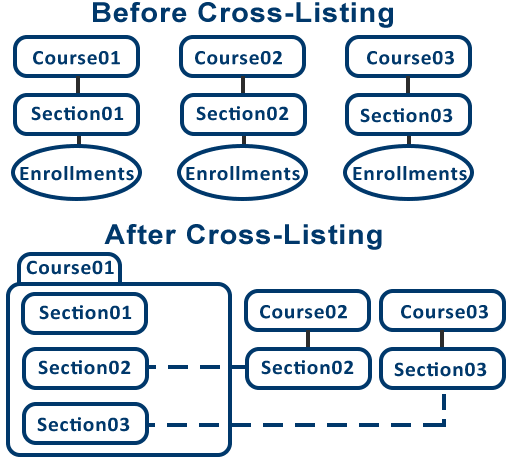
- The instructor identifies the course to serve as a "Parent" course.
- The 'Parent' course will contain enrollments from all Cross-Listed or "Child" courses.
- Once the courses are cross-listed, teachers and students will only see the 'Parent' course on their Canvas Dashboard.
Students will see the name of the parent course (e.g. FA26.ENGL.1010.20001) on their Canvas dashboard. Be sure to inform your students of this.
The Pros of Cross-Listing
- Build content in the parent course and all child courses will see the content.
- Make changes and updates in the parent course for all sections to see.
- See all students enrolled in the cross-listed course sections under the People link and in the gradebook.
- Create section-specific assignments, graded discussions, and quizzes or assign a common activity to all sections.
The Cons of Cross-Listing
- Courses cannot be separated after cross-listing without losing all student submissions and grades for the child courses.
- Teachers and students will only see the 'Parent' course on their Canvas Dashboard.
Students will see the name of the parent course (e.g. FA26.ENGL.1010.20001) on their Canvas dashboard. This can create confusion for the students. Be sure to inform your students that this will happen. - Section-specific assignment grades cannot be muted. You either have to mute all sections or none.
- Gradebook exports will include all students in all sections.